
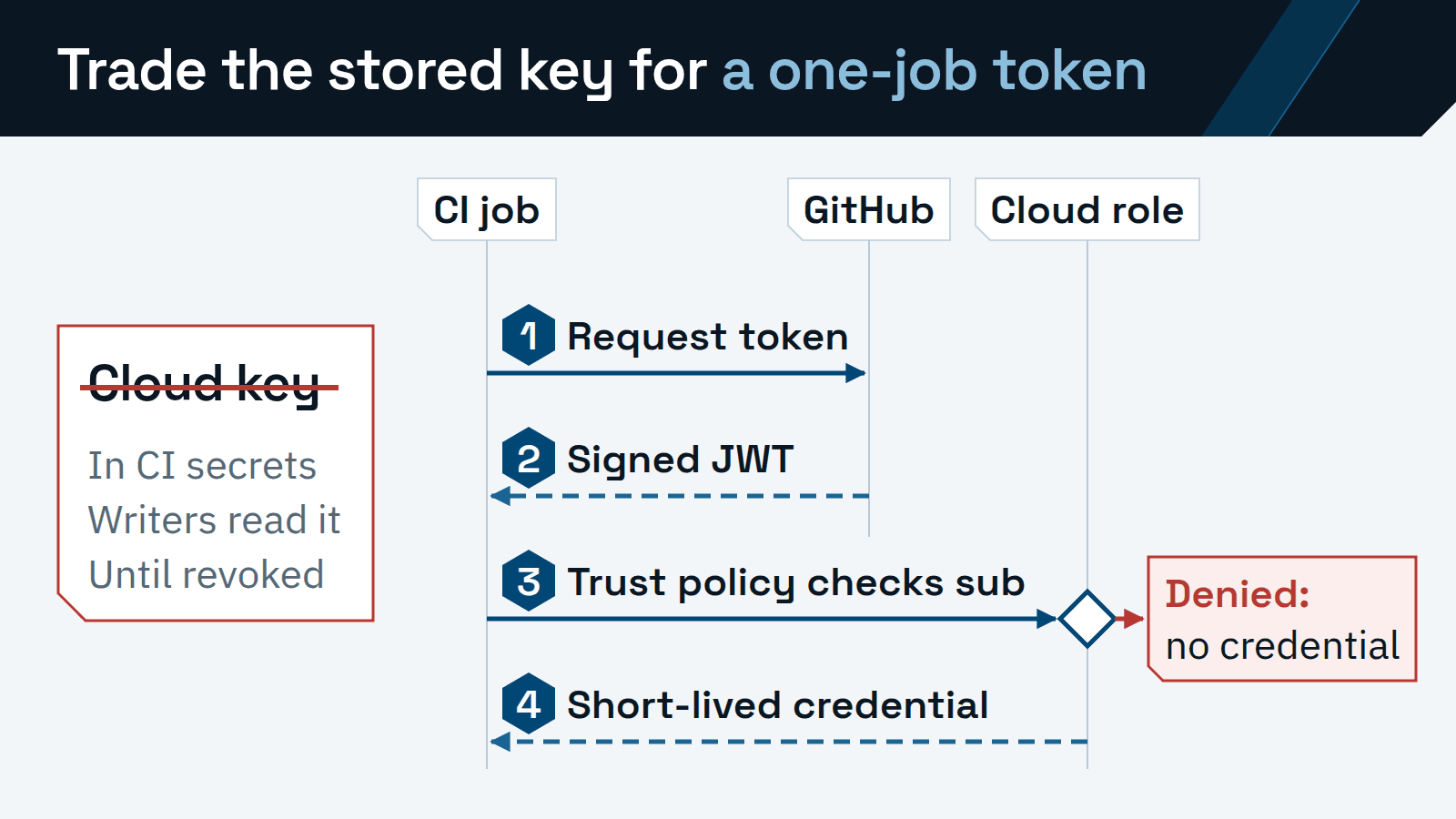
Replace every cloud key stored in CI with OpenID Connect (OIDC) federation. The job asks the CI platform for a signed token, and the cloud trades it for a credential that expires with the job. No cloud secret sits in a CI variable for anyone to copy.
The switch moves the risk to a new place. A stored key was the thing to guard. After the move, the trust policy on the cloud role decides which jobs get in. Write it loosely and any branch can deploy to production. So the work is in writing that condition and proving it refuses the jobs it should.
The pattern applies wherever a pipeline signs in: the cloud account, the container registry, the Terraform state backend and AI provider APIs. The examples use GitHub Actions and AWS, with Azure Pipelines alongside. For AI-provider calls, the Claude Platform on AWS access guide is the worked example.
Why stored cloud keys are the first target in a CI breach
OWASP’s Top 10 CI/CD Security Risks lists insufficient credential hygiene as CICD-SEC-6. Its risk page calls credentials “the most sought-after object by adversaries.” A cloud key in a CI variable is that object, kept where many people and tools can reach it. The same page recommends temporary credentials over static ones.
GitHub’s secure-use reference sets the size of the exposure. Any user with write access to a repository has read access to all of its secrets. A compromised third-party action in the job gets them as well. In GitHub’s words, it “would have access to all secrets configured on your repository.”
CICD-SEC-2, inadequate identity and access management, covers the other half. OWASP warns that shared identities widen a credential’s footprint and make accountability hard during an investigation. One cloud key copied into ten repositories is a shared identity. OIDC gives each job a short-lived identity of its own.
How a job gets a token that lives for one job
The trust is set up once per cloud account. The account registers GitHub’s OIDC issuer, and a role states which workflows may assume it. After that, every run that needs the cloud makes four hops.
The job requests a token.
The job needs the id-token: write permission. GitHub says it only allows fetching the token and grants no write access to other resources.
GitHub signs a JSON Web Token (JWT) for that job.
Its claims name the repository, the ref, the environment when the job uses one, the workflow and whether the runner is GitHub-hosted or self-hosted.
The job presents the token, and the cloud checks its claims against the role’s trust policy.
On AWS the trust policy checks two claims: the audience, aud, which says who the token is for, and the subject, sub. A mismatch ends the request with no credential.
The cloud returns a short-lived credential.
GitHub describes it as “only valid for a single job, and then automatically expires.”
The sub claim carries the decision. GitHub builds it from the repository plus one qualifier, in this order of precedence. A job that references an environment gets repo:ORG/REPO:environment:NAME. A pull request run without an environment gets repo:ORG/REPO:pull_request. Any other run gets the branch or tag, as in repo:ORG/REPO:ref:refs/heads/main.
Check the subject format before writing any condition. GitHub’s OIDC reference says repositories created after July 15, 2026 use an immutable subject with owner and repository IDs, such as repo:octo-org@123456/octo-repo@456789:ref:refs/heads/main. Older repositories keep the name-only format unless an admin opts in. A rename or transfer after that date moves a repository to the new format. GitHub Enterprise Server does not get it.
Scope the trust condition to one repository and one environment
GitHub’s AWS setup guide includes a trust policy that matches repo:octo-org/octo-repo:* with StringLike. GitHub explains that it allows “any branch, pull request merge branch, or environment” in the repository. That example is fine for proving the plumbing in a sandbox account.
Put the same wildcard on a production role and the role belongs to anyone who can push a branch. That is the same group that could read the old secret. A wildcard subject is a stored key with extra steps.
Write every other condition with StringEquals and the exact subject, and keep the audience check. For the official AWS action the audience is sts.amazonaws.com. The wildcard is the one StringLike case, and it stays in a sandbox.
"Condition": {
  "StringEquals": {
    "token.actions.githubusercontent.com:aud":
      "sts.amazonaws.com",
    "token.actions.githubusercontent.com:sub":
      "repo:ORG/REPO:environment:production"
  }
}Then pick the subject by what the job does.
repo:ORG/REPO:*StringLike, sandbox onlyMatchesAny branch, pull request merge branch or environment in the repository.
Use it forA sandbox account while you test the setup. Never a role that reaches production.
repo:ORG/REPO:ref:refs/heads/mainMatchesJobs running on main that name no environment.
Use it forBuild and publish steps after a merge, such as pushing an image to the registry.
repo:ORG/REPO:environment:productionMatchesJobs that reference the production environment.
Use it forDeploys, once the environment has protection rules.
repo:ORG/REPO:pull_requestMatchesPull request runs that name no environment.
Use it forA plan role that reads state and writes only the lock file, for a Terraform plan.
An environment subject is only as strong as the environment’s rules. GitHub’s environment guide says a workflow that references a missing environment creates it, with no protection rules. Anyone who can edit workflows can do that. Create and protect the environment before the trust policy names it.
Then set its deployment protection rules. Limit deployment branches to main or to release tags. Add required reviewers, turn on prevent self-review, and clear the option that lets administrators bypass the rules. A job that references the environment waits until those rules pass.
Check the GitHub plan before you rely on reviewers. On Free, Pro and Team plans, GitHub limits required reviewers and wait timers to public repositories. Private repositories on those plans still get deployment branch rules. Required reviewers on a private repository need GitHub Enterprise.
Adding environment: production to a deploy job breaks a working pipeline. It changes the job’s subject from the branch form to the environment form, so a trust policy written for the branch denies the job. Change the policy and the workflow together.
A team with many repositories may want one shared deploy workflow. GitHub can add job_workflow_ref to the subject through a customization template, so a role can require one approved reusable workflow. Create the matching cloud condition first. GitHub warns that tokens may be rejected if the condition is missing when the next job runs.
Azure Pipelines: federate the service connection
GitHub Actions jobs that deploy to Azure use the same subject strings, which GitHub’s reference lists for Azure beside AWS. Azure Pipelines works differently. Its cloud identity lives in an Azure Resource Manager service connection, and Microsoft recommends workload identity federation for it. Microsoft says federation “eliminates the need for secrets and secret management.”
Microsoft’s conversion tool moves an existing connection to federation in place when Azure DevOps created it and only one project uses it. A converted connection can be reverted within seven days.
In Azure Pipelines the scoping decision sits on the connection. Microsoft advises against granting every pipeline access to a connection and says to authorize each pipeline individually. Then add approvals and checks. Checks live outside the YAML, so a user who edits the pipeline file cannot change them.
A branch control check on the service connection limits it to named branches, written in full, such as refs/heads/main. It can also require that those branches have protection enabled. A manual approval on the production environment adds the human gate.
Microsoft retires the vstoken.dev.azure.com issuer on July 1, 2027, for federated connections in Azure public cloud. The change covers single-tenant app registrations and managed identities. New connections already use the Microsoft Entra issuer, and Azure DevOps flags the existing connections that need updating.
Terraform state: give the backend its own roles
Terraform signs in to its state backend separately from the deploy steps, so the backend needs the same move. HashiCorp’s s3 backend and azurerm backend pages give the settings and roles below.
s3SettingLeave access_key out of the backend block. The backend reads the credentials the job’s OIDC role already set in the environment, or a token file through assume_role_with_web_identity.
RolesA plan role that reads state and writes only the lock file: list and get on the state, and get, put and delete on the .tflock file. The apply role adds put on the state file.
azurermSettingSet use_oidc and use_azuread_auth to true. On GitHub the backend finds the ID token itself. On Azure Pipelines, add oidc_azure_service_connection_id.
RolesStorage Blob Data Contributor on the state container, HashiCorp’s least-privilege recommendation. Access keys and SAS tokens are “Not recommended for new workloads.”
Pass credentials through environment variables, as both pages recommend. Values passed with -backend-config or written into the configuration end up in the .terraform directory and in plan files. Keep write access to the state file for the apply job behind the protected environment.
Prove allow and deny before you delete the old key
Leave the old key in place but unused while you test. Write the expected result for each case first. Then change one thing at a time: the branch, the environment, the repository or the audience.
- Deploy job on main, production environment, rules passed
- Expect Allow
- A role session tied to this run. It is the control for every denial below.
- The same workflow pushed from a feature branch
- Expect Deny
- Rejected at role assumption, with no credential issued.
- The deploy job with its environment line removed
- Expect Deny
- The subject falls back to the branch form and no longer matches.
- Another repository in the organization, same workflow file
- Expect Deny
- The repository segment of the subject differs.
- A pull request run against the deploy role
- Expect Deny
- Pull request runs reach only the plan role, which reads state and writes only the lock file.
- A token requested with a different audience
- Expect Deny
- The audience condition does not match.
- An allowed job calling an action outside the role’s policy
- Expect Deny
- An authorization error from the service after a successful sign-in.
- The old key deactivated, then one full release
- Expect Pass
- Every stage green with no stored cloud key in reach.
Count a denial only when an allow case passed in the same test run. Otherwise a typo in the role ARN can look like a working control. GitHub also advises reading the run logs after testing valid and invalid inputs, to confirm nothing sensitive was printed.
Deactivate the old key before you delete it. Delete it once a full release has run green without it, then remove the CI variable that held it.
What OIDC leaves in place
Over-scoped roles. The trust policy decides who may assume the role. The permission policy decides what the role can do. An administrator role behind a perfect subject condition is still an administrator in every job that matches.
Third-party actions. Every action in the deploy job runs with the credential in reach. GitHub’s strongest recommendation is a workflow dependency lockfile, which records the exact commit of every action, including transitive ones. Where a repository cannot adopt one, pin each action to a full-length commit SHA.
Dependabot creates no alerts for actions pinned to a SHA, so pair the pins with Dependabot version updates. GitHub also recommends setting the GITHUB_TOKEN default to read access on repository contents and raising it per job.
Self-hosted runners. GitHub-hosted runners run each job in a clean, isolated virtual machine. GitHub says self-hosted runners can be persistently compromised by untrusted code and “should almost never be used for public repositories.”
GitHub also asks whether a runner machine can reach sensitive services, such as cloud metadata services. If it can, the machine’s own cloud identity is open to every job it runs, whatever the trust policy says. Prefer just-in-time runners, which take at most one job, and keep production deploys on runners that pull requests cannot reach.
The token’s runner_environment claim records github-hosted or self-hosted. GitHub notes that custom claims are unavailable in AWS, so an AWS trust policy checks the audience and subject. Add runner_environment to the subject through GitHub’s subject customization template, and a production role can refuse self-hosted runners.
Build integrity. A valid token identifies the job that ran. Whether the artifact matches its source is a separate question, and SLSA’s build track addresses it. Build L3 requires a platform that stops runs from influencing one another and keeps provenance signing secrets away from user-defined build steps.
An illustrative rollout for twenty repositories
Illustrative scenario: a platform lead owns twenty repositories. They deploy to two AWS accounts through GitHub Actions and to one Azure subscription through Azure Pipelines, and Terraform state sits in S3. The order below is a planning example written from the steps above. It describes no client engagement and no measured result.
Inventory every stored credential.
List the cloud keys in repository, organization and environment secrets, Azure DevOps service connections and variable groups. Record which job uses each one and what it can reach.
Register the issuer and settle the subject format.
Add GitHub’s OIDC provider once per AWS account. Note which repositories already use the immutable subject, and decide whether older ones opt in.
Move one low-risk service first.
Pick a repository with a staging environment. Write its roles, run the allow and deny matrix, deactivate the old key and ship one full release.
Move the Terraform state roles.
Split the plan and apply roles for the infrastructure repositories. Every later deploy reads that state, so prove it before batching.
Convert the Azure service connections.
Use the conversion tool where a connection qualifies and recreate the rest. Test each connection’s branch control check and approval before the seven-day revert window closes.
Batch the remaining repositories.
Group them by deploy target. Each gets its own role per environment from the first repository’s template, and each batch re-runs the matrix.
Delete the old keys and keep them gone.
Delete the deactivated keys and the CI variables that held them. Secret scanning finds keys already in the Git history, and push protection blocks a push that contains a supported secret type. On private repositories both need GitHub Secret Protection.
The first repository produces the trust policy template and the test matrix. The other nineteen reuse both with a new subject.
ITECS runs this migration as part of CI/CD pipeline design and hardening, one of its DevOps services for software teams.
