
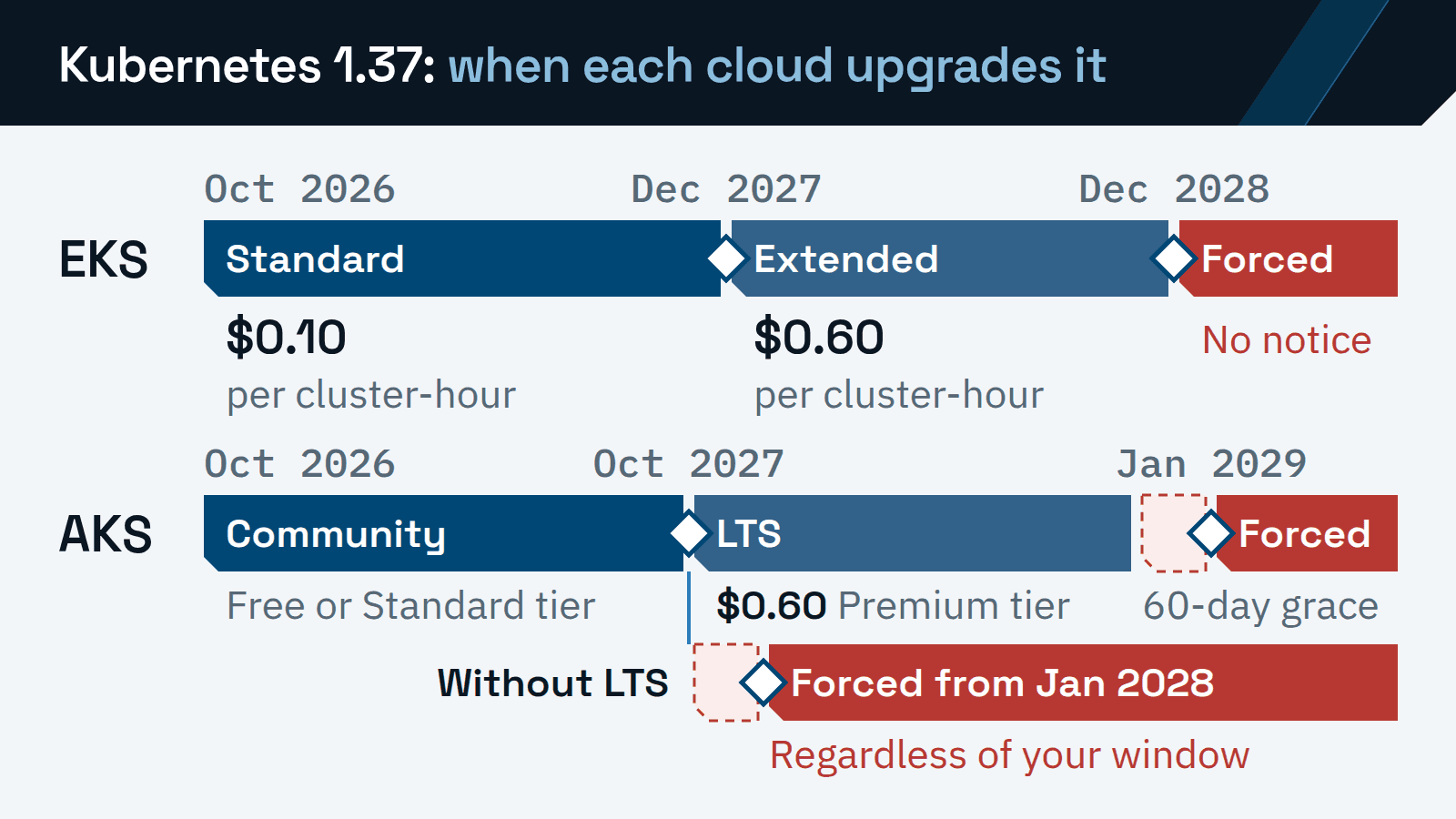
Every Kubernetes version on EKS and AKS has an end date. AWS already upgrades EKS clusters left on a version past that date, and Azure starts doing the same on June 1, 2027. An EKS cluster that stays behind slides into extended support, a paid year at a higher rate. On AKS, staying past a version’s supported year takes long-term support on the Premium tier. When either runs out, the cloud forces the upgrade on its own schedule.
The fee starts when the upgrade work stops. Kubernetes ships a minor version about every four months, and a cluster moves one minor version at a time. The nodes and add-ons follow each upgrade of the control plane (the API server and scheduling components the cloud runs for you). A team that does not staff that work every quarter pays for it in extended support, or in a forced upgrade.
Every price, window and date below is as AWS, Microsoft and the Kubernetes project published it on November 8, 2026. The calendars move, so re-read them before each quarter’s plan. If your workloads are still moving onto EKS, start with the EKS migration assessment guide.
What you pay when a cluster falls behind
AWS charges every EKS cluster an hourly fee set by the age of its Kubernetes version. The EKS pricing page lists $0.10 per cluster per hour in standard support and $0.60 in extended support. AWS describes the extended rate as the standard fee plus $0.50.
Azure charges AKS by cluster tier instead. Long-term support (LTS) comes only with the Premium tier, and Microsoft’s LTS page says enabling it means moving the cluster to Premium and selecting the LTS plan. The AKS pricing page shows Premium at $0.60 per cluster per hour, or $438 a month, for Central US in US dollars.
EKS: by version age
- Standard support
- $0.10 per cluster per hour$73 a month
- A version’s first 14 months after its EKS release.
- Extended support
- $0.60 per cluster per hour$438 a month
- The next 12 months only. On by default for new and existing clusters.
AKS: by cluster tier
- Free tier
- No cluster fee
- Community support with no financially backed uptime SLA.
- Standard tier
- $0.10 per cluster per hour$73 a month
- Community support with the uptime SLA.
- Premium tier
- $0.60 per cluster per hour$438 a month
- The uptime SLA plus LTS, about 24 months of support per version. Billed for every hour on the tier.
The two clouds bill the extra time differently. EKS charges the extended rate only during the extra year. AKS charges the Premium rate for every hour the cluster stays on that tier, including community-support months if you enroll early.
Each fee is per cluster, so it multiplies across staging, production and every region. AWS’s own example on its pricing page keeps one cluster on a version for 26 months: 14 months at $0.10 and 12 at $0.60, an average of $0.33 an hour.
The two clouds also set different defaults. AWS’s version lifecycle page says extended support is enabled by default, so an EKS cluster nobody upgrades moves to the higher rate without a decision. Microsoft says enrollment in LTS is never automatic, so an AKS cluster nobody upgrades drops out of support instead.
A minor version every four months, patched for a year
AWS and Microsoft give the same upstream pace. AWS says the community releases a new minor version “on average once every four months.” Microsoft’s supported versions page says “roughly every four months.”
Each minor version then gets about a year of patches. The Kubernetes releases page gives versions 1.19 and newer “approximately 1 year of patch support” and keeps release branches for the three newest minor versions, now 1.37, 1.36 and 1.35.
Put the release pace and the patch window together and a cluster needs about three minor-version upgrades a year to stay current. Scheduled one per quarter, that leaves a spare quarter each year for the upgrade that slips. EKS and AKS each sell extra time on top of that window, then force the upgrade themselves.
The calendar below lines up each version’s end dates on EKS, on AKS and upstream, one row per version.
| Version | EKS standard ends | EKS extended ends | AKS end of life | AKS forced upgrade | AKS LTS ends | Upstream end of life |
|---|---|---|---|---|---|---|
| 1.37 | Dec 1, 2027 | Dec 1, 2028 | Oct 2027 | Jan 2028 | Oct 2028 | Oct 28, 2027 |
| 1.36 | Aug 2, 2027 | Aug 2, 2028 | Jun 2027 | Sep 2027 | Jun 2028 | Jun 28, 2027 |
| 1.35 | Mar 27, 2027 | Mar 27, 2028 | Mar 2027 | Jun 2027 | Mar 2028 | Feb 28, 2027 |
| 1.34 | Dec 2, 2026 | Dec 2, 2027 | Nov 2026 | Jun 2027 | Nov 2027 | Oct 27, 2026 (passed) |
| 1.33 | Jul 29, 2026 (passed) | Jul 29, 2027 | Jul 2026 (passed) | Jun 2027 | Jul 2027 | Jun 28, 2026 (passed) |
| 1.32 | Mar 23, 2026 (passed) | Mar 23, 2027 | Mar 2026 (passed) | Jun 2027 | Mar 2027 | Feb 28, 2026 (passed) |
| 1.31 | Nov 26, 2025 (passed) | Nov 26, 2026 | Nov 1, 2025 (passed) | Jun 2027 | Nov 2026 | Nov 11, 2025 (passed) |
EKS: standard, extended, then a forced upgrade
On EKS, a minor version gets 14 months of standard support from its EKS release, then 12 months of extended support. Billing at the extended rate starts at the beginning of the day the version leaves standard support, in UTC.
Each cluster’s upgrade policy decides what happens when standard support ends.
- EXTENDED, the default
When standard support endsThe cluster stays on its version in extended support for 12 months. When that ends, AWS upgrades the control plane.
What the cluster pays$0.60 per cluster per hour from the first day of extended support.
- STANDARD
When standard support endsAWS upgrades the cluster automatically to the next version.
What the cluster paysThe standard $0.10 per cluster per hour. It never pays the extended rate.
Set the policy before that date. AWS says extended support cannot be disabled once a cluster has entered it, and the policy can only change on a version in standard support. From then on, upgrading to a standard-support version is what stops the extended charge.
When extended support ends, AWS forces an upgrade of the control plane to the oldest version it still supports. AWS calls it an automatic upgrade and gives no time frame. Its FAQ says “You won’t receive any notification before the update.” Only the control plane moves, though EKS Auto Mode nodes may follow. Managed node groups and self-managed nodes stay on the old version, and you update the add-ons.
An upgrade you run can be rolled back to the previous minor version within seven days. A forced upgrade at the end of extended support cannot. AWS announces each end of standard support at least 60 days ahead, through the AWS Health Dashboard for clusters on that version.
As of November 8, 2026, the next two EKS cut-overs fall within four weeks. Version 1.31 leaves extended support on November 26, 2026, after which AWS can upgrade it at any time. Version 1.34 leaves standard support on December 2, 2026, and moves to $0.60 per cluster per hour unless its policy is STANDARD.
AKS: support, a grace period, then a forced upgrade
AKS supports three generally available minor versions: the newest and the two before it, which Microsoft calls N-2. When AKS releases a new minor version, the oldest goes out of support 30 days later. Microsoft’s calendar sets each version’s end of life about 12 months after AKS general availability, on the last day of the listed month.
End of life starts platform support, a reduced plan. Microsoft still supports the platform, such as node health and running the upgrade. Kubernetes bugs and CVEs in that version fall outside it, and no new cluster can be created on it.
Platform support opens a 60-day grace period the day after end of life. When it ends, AKS forces the upgrade, which Microsoft calls a platform-initiated upgrade. The first ones run from June 1, 2027. Until May 31, 2027, clusters on unsupported versions can upgrade at their own pace.
A forced AKS upgrade overrides the controls a team sets for planned upgrades.
- Maintenance window
- Regardless of your window. The upgrade can start at any time from the planned month.
- Deprecated API check
- Bypassed. The upgrade proceeds while removed APIs are still in use.
- Pod Disruption Budgets
- Best effort. AKS overrides a budget if the node drain times out or fails.
- Surge settings
- Best effort. Without surge capacity, AKS upgrades one node at a time.
- Rollback
- Not possible. The version you ran before is unsupported.
The upgrade moves the whole cluster, control plane first and then node pools, one minor version at a time until the cluster is supported again. AKS rate-limits these upgrades by region, subscription and source version, so a cluster can be upgraded in its listed month or later.
LTS adds a second year. A version on the Premium tier gets one year of community support and one year of LTS, about 24 months from general availability. At LTS end of life the same 60-day grace applies, and AKS then upgrades the cluster to the next supported LTS version.
Versions up to 1.35 share the first month of forced upgrades, June 2027. Later versions follow the months in the calendar above: September 2027 for 1.36 and January 2028 for 1.37.
Why the control plane is the easy part
A control-plane upgrade is one command on either cloud. The work sits around it, in a fixed order. AWS’s upgrade guide sets the order below. On AKS, a full upgrade runs the control plane first and then each node pool in turn.
Check what the next minor version breaks.
Check each add-on, operator, Helm chart and node image against the target version. Run EKS upgrade insights or the AKS API deprecations view for removed APIs, and fix what they find in staging first.
Upgrade the control plane by one minor version.
EKS needs up to five free IP addresses in the cluster’s subnets. Once started, the upgrade cannot be paused. If its health checks fail, EKS reverts and the cluster stays on the old version.
Replace the nodes.
Drain each node and replace it on the new version. EKS managed node groups and self-managed nodes do not follow the control plane on their own. On AKS, check VM quota and subnet IPs for the surge nodes.
Update the add-ons and cluster apps.
On EKS that means the VPC CNI, CoreDNS and kube-proxy, plus apps tied to the minor version, such as the Cluster Autoscaler.
Update the clients.
kubectlmust stay within one minor version of the API server. Update it wherever it runs against the cluster, CI jobs included.
Plan one minor version per upgrade. The version skew policy requires kube-apiserver, the control plane’s API server, to move one minor version at a time, even in a single-instance cluster. EKS follows that rule, and so does AKS outside LTS.
Nodes have more room. The kubelet, the agent that runs pods on each node, may run up to three minor versions behind kube-apiserver. A kubelet that far behind must be upgraded before the control plane can move again. Kubernetes does not support in-place minor-version upgrades of the kubelet, so each node is drained first.
Each minor version can stop serving deprecated API versions, and the Kubernetes Deprecated API Migration Guide lists them by release. As of November 8, 2026, it lists nothing after v1.32. A cluster on 1.31 meets that one removal, flowcontrol.apiserver.k8s.io/v1beta3, on the way to 1.32. From 1.33 on, the main check is everything installed on the cluster: add-ons, operators, Helm charts and node images.
Each of those has its own supported Kubernetes versions, and Microsoft warns that a forced AKS upgrade does not validate self-managed add-ons for the target version. Run the API checks before every window anyway. EKS upgrade insights look for deprecated API use over a rolling 30-day window, so a fix can take up to 30 days to clear. In the Azure portal, the Kubernetes API deprecations view under Diagnose and solve problems shows the same usage for AKS.
Falling behind multiplies all of this. Microsoft notes that the further a cluster is from the lowest supported version, the more removed APIs and incompatible self-managed add-ons there may be to fix. A cluster three minor versions behind runs the whole order three times, with an add-on and node-image review each time.
When extended support or LTS is the right call anyway
Paying to stay is reasonable when the alternative is a rushed upgrade into an incompatibility you cannot fix in time. One case is a third-party operator or vendor chart that does not yet support the next minor version. Extended support or LTS buys the months to replace it.
Change freezes are another. Microsoft’s pricing tiers page lists the Premium tier for “Regulated environments requiring extended maintenance windows.”
Know what the extra year covers. On EKS, extended support includes control-plane security patches, patches for the VPC CNI, kube-proxy and CoreDNS add-ons, EKS optimized AMIs and AWS technical support. On AKS, LTS supports only the two most recent patch versions, and add-ons keep their own lifecycles. Microsoft-managed Calico, for one, is not supported in LTS.
Enter the extra year with the upgrade date already set. On AKS, LTS cannot be disabled for a version past community support, so leaving Premium means upgrading to a community-supported version first.
A cadence that works for a two-to-five person platform team
A quarterly plan keeps a current cluster current. Against about three releases a year, four upgrades gain only one minor version a year, so a cluster that is already behind catches up first.
Catch up at one minor version a month. At that pace each upgrade outlasts the seven-day EKS rollback window, and EKS upgrade insights get their 30-day window to confirm the fixes. Count the upgrades in the calendar: from 1.32, three reach 1.35, the oldest version the Kubernetes project still patches. Version 1.35 leaves EKS standard support on March 27, 2027, so the first quarterly upgrade lands before then.
Illustrative plan: a platform team of two to five engineers runs EKS and AKS clusters in staging and production, all of them current. It describes no client engagement and no measured result.
- Month 1
Pick the target and check what it breaks.
List each cluster’s version and next cut-over. On AWS,
aws eks describe-cluster-versionsreturns the support dates. On Azure, Microsoft’s Resource Graph query lists every cluster’s version. The target is the next minor version, and each add-on, chart or API finding gets an owner and a fix date inside the month. - Month 2
Upgrade staging, ship a release, then upgrade production.
Follow the upgrade order above and run one normal release through staging first. On AKS, run the production minor-version upgrade yourself with
az aks upgradein a window you choose. Keep the patch channel on inside a planned maintenance window of at least four hours, since it never changes the minor version. On EKS, keep the seven-day rollback window clear of other changes. - Month 3
Hold the slack.
Apply patch releases, prepare the next minor version and finish any cluster that slipped.
One engineer owns each quarter’s upgrade, and a second reviews every change and runs production. The owner rotates each quarter, so the runbook stays current.
Once current, a cluster on this plan stays inside standard support on EKS and community support on AKS. No forced upgrade applies to it, and it never pays the extended support rate.
ITECS keeps clusters on this calendar under Kubernetes platform operations for EKS and AKS, part of its DevOps and platform engineering for teams that ship software.
