
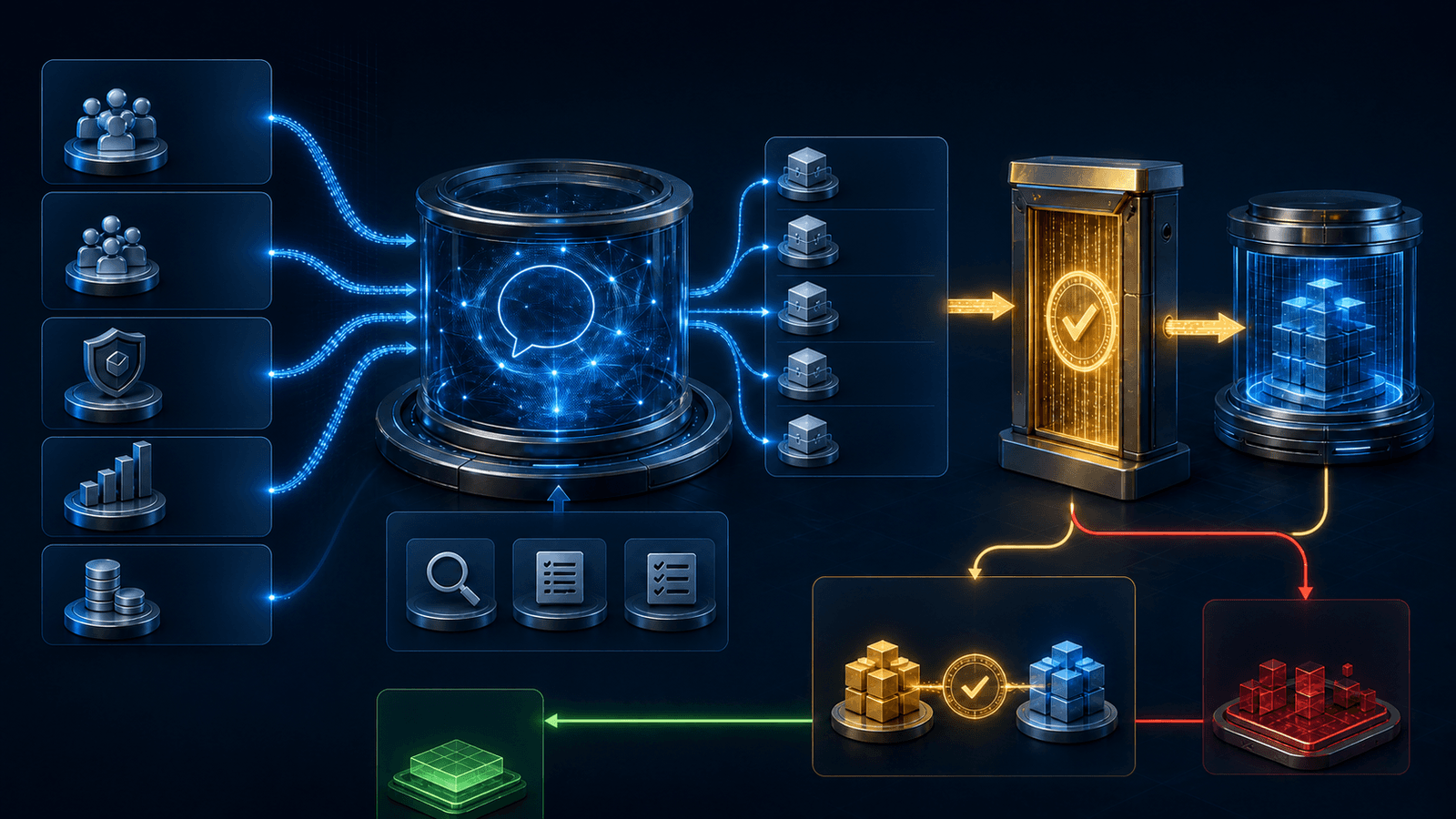
ChatGPT Enterprise and Business administrators should pilot the new Admin plugin as a permission-aware interface to workspace administration—not as a conversational shortcut around change control. OpenAI designed the plugin to analyze activity, manage members and groups, review effective permissions, change supported access settings, adjust usage limits, and handle spending requests from ChatGPT Work and Codex. That can reduce administrative friction, but it also puts discovery and mutation inside the same conversation.
The safe rollout is narrow and evidence-driven: verify plan, seat, role, surface, and plugin eligibility; enable it only for a named admin pilot group; inventory every read and write action; keep high-impact changes approval-gated; test with nonproduction identities; independently verify each structured result against the Admin Console; route exceptions instead of guessing; log recurring automations; keep analytics separate from mutation rights; and prove rollback before expanding. Conversational convenience changes the interface. It does not change who owns the workspace, the policy, or the outcome.
This article is an operational governance guide, not a statement that every listed capability is available in every workspace. Plugin installation and invocation depend on the current plan, workspace configuration, role, region, surface, rollout, included apps, and underlying permissions. Administrators should use the live plugin listing, workspace settings, applicable agreement, and current OpenAI documentation as the procedural source of truth.
What OpenAI launched on August 25
OpenAI's August 25, 2026 launch announcement describes the Admin plugin for ChatGPT Work and Codex as a way to connect a workspace question to a supported administrative action. Documented examples include reviewing adoption and credit use, finding members or groups approaching limits, adding or removing members, changing group membership, diagnosing effective permissions, controlling feature or model access, adjusting usage limits, and approving or denying spending requests.
The launch also describes recurring workflows, such as routing pending usage requests to Slack or Microsoft Teams and applying predefined criteria to feature-access requests while sending exceptions for review. OpenAI says the plugin maps an administrator's instruction to a supported read or write action, works within that person's existing role and permissions, and returns a structured result showing whether an action completed and what changed.
Those are product statements, not proof that a particular workspace has configured every dependency correctly. Existing authority reduces privilege-escalation risk, but it does not eliminate wrong-target selection, stale group data, policy conflicts, unintended scope, an approval made without enough context, a partial failure, or a mismatch between a reported result and effective workspace state. The business control has to cover those remaining failure modes.
OpenAI's launch instructions say to enable the plugin in ChatGPT workspace settings and install it from the Plugins directory in ChatGPT Work on the web or desktop app. Current plugin guidance adds important qualifiers: directory visibility does not prove eligibility; availability can depend on the plan, role, workspace settings, surface, region, and included capabilities; plugin installation and required app access are separate controls; and Codex directory changes can take time to refresh.
The control model has more than one permission switch
OpenAI's current plugin-control documentation separates the capability chain into plugin availability, bundled skills, app access, supported actions and confirmation behavior, authorization in a connected service, and runtime permissions. A request has to pass every relevant boundary. Making a plugin available to an administrator does not create a missing seat, grant a broader workspace role, enable an underlying app, override a source system, or relax a local Codex policy.
That distinction matters even for an OpenAI administrative plugin. A plugin can be installed but not usable by a particular role. A user may have analytics visibility without member-management authority. A supported write can be exposed but still require approval. An identity-provider group or SCIM process may remain the authoritative owner of membership, making a direct workspace edit temporary or subject to later overwrite. The effective system is the intersection of the plugin, workspace, identity provider, billing model, local runtime, and owning administrative process.
Treat the plugin as a new administrative client. Place it in the same control inventory as the Admin Console, identity provider, SCIM provisioning, support procedures, reporting APIs, and any scripts that change workspace state. Document which system owns each field. If the identity provider owns a group, use the plugin to diagnose the state or route the request to the owner; do not create a competing source of truth because a conversational write is available.
The 12-control rollout contract
Use this matrix as an acceptance contract for the pilot. Replace generic roles with named people or on-call groups, attach the evidence, and set a maximum time for verification and recovery. A row is not complete because the setting exists; it is complete when the team has tested the intended behavior, the denied behavior, the authoritative result, and the rollback path.
| Control | Pilot rule | Evidence to retain | Pause or roll back when |
|---|---|---|---|
| 1. Eligibility | Verify the workspace plan, seat, built-in admin authority, plugin installation policy, app requirements, region, and supported surface for each tester | Admin plugin listing, assigned roles, effective permissions, workspace settings, client version, and test date | A tester can invoke a capability that their approved role, seat, or workspace policy should not permit |
| 2. Pilot group | Limit availability to named owners and administrators with a defined business purpose; do not use workspace-wide installation | Pilot roster, accountable owner, use cases, start and end dates, training record, and removal procedure | The plugin becomes available outside the approved group or an unowned administrator joins the pilot |
| 3. Action inventory | Catalog every supported read and write action, its parameters, target scope, side effects, dependencies, and reversibility | Versioned capability register with read, propose, write, deny, and not-yet-tested classifications | A new, renamed, or behaviorally changed action appears without review and a representative test |
| 4. Approval gates | Require a named human reviewer before member removal, broad group changes, permission changes, model access, workspace limits, or spending decisions | Approval policy, reviewer identity, requested delta, affected scope, decision, timestamp, and final result | A high-impact write completes without the required reviewer or exceeds the reviewer’s delegated authority |
| 5. Nonproduction tests | Exercise member, group, permission, usage-limit, and spending workflows against a sandbox or reversible test identities and groups | Test cases, expected result, before state, structured result, Admin Console after state, cleanup, and exceptions | Testing touches a real employee, production group, live entitlement, or budget that was not explicitly placed in scope |
| 6. Result verification | Treat the plugin response as a receipt, then independently compare identifiers, fields, and effective state with the Admin Console or owning system | Request ID, target IDs, before-and-after values, verification source, verifier, timestamp, and mismatch disposition | The response says completed but authoritative state is missing, delayed beyond the runbook threshold, or materially different |
| 7. Exception routing | Auto-route incomplete context, policy conflicts, outliers, ambiguous identities, unusual spend, and unsupported requests to an owner | Exception rules, destination queue, severity, response target, owner, decision, and no-action outcome | An automation guesses through an exception, broadens scope, retries a mutation, or grants access to clear its own error |
| 8. Automation records | Register every recurring or event-driven workflow with its trigger, cadence, identity, data, actions, limits, reviewers, and destinations | Automation ID, version, owner, schedule or event, approval path, run history, costs, failures, and retirement date | A recurring workflow runs without an owner, current policy, bounded identity, review path, or usable run history |
| 9. Analytics separation | Give reporting users analytics-only access and keep member, group, permission, limit, and spending mutations with separate admin roles | Role map, analytics audience, export handling policy, mutation denial tests, and periodic access certification | A reporting identity can change workspace state or an admin export reaches an unapproved audience or destination |
| 10. Rollback | Capture the pre-change state and define the inverse action, recovery owner, maximum recovery time, and manual Admin Console path | Rollback test, saved state, dependency order, result verification, unresolved side effects, and recovery timestamp | The team cannot restore the prior effective state or determine which downstream systems received the change |
| 11. Escalation | Define operational, identity, security, finance, privacy, and OpenAI support paths with severity and notification thresholds | On-call contacts, incident criteria, evidence checklist, containment steps, communications owner, and tabletop results | Unauthorized access, unexplained mutations, spending anomalies, missing evidence, or repeated verification mismatches occur |
| 12. Change review | Re-review the plugin whenever its version, skills, apps, actions, permissions, approval behavior, fields, or supported surfaces change | Version diff, refreshed inventory, targeted regression tests, access recertification, approval, and rollback target | A capability change reaches the pilot before its read/write classification, tests, permissions, and recovery path are renewed |
1. Confirm plan, seat, role, surface, and plugin eligibility
Start from the individual tester, not from the workspace logo on the contract. Record the workspace plan, the member's seat, built-in role, custom roles, applicable groups, Work and Codex access, plugin installation policy, required app access, supported surface, client version, region, and current plugin version. OpenAI's roles and workspace permissions guide distinguishes seats, built-in administrative roles, custom roles, plugin permissions, connected-system access, and local runtime policy. Access in one boundary does not automatically confer authority in another.
This article focuses on ChatGPT Enterprise and Business administrators, but do not infer exact Admin plugin availability from that audience alone. Open the live Admin plugin listing and confirm that the intended workspace, plan, role, and surface are eligible. For ChatGPT Work, verify the seat includes ChatGPT rather than assuming a Codex-only seat grants Work access. For Codex use, test the actual supported client; general plugin documentation says plugins are not available in the IDE extension even though they work on other supported ChatGPT and Codex surfaces.
Run positive and negative entitlement tests. A named pilot admin should be able to find and invoke the approved capability. A regular member should not. An analytics-only user should be able to view only the reporting intended for that role and should be denied workspace mutations. A former admin, disabled account, or user removed from the pilot group should lose access on the required clock. Preserve screenshots or exports of the settings and the test results without capturing unnecessary member data.
2. Enable the plugin for a small administrative group
Do not install the Admin plugin for every eligible administrator on day one. Create a small pilot group with a workspace owner or accountable executive, one or two operational administrators, an identity or access owner, a finance or FinOps reviewer for spending workflows, and security support. Keep the group small enough that every request can be reviewed and every result can be reconciled.
Define the pilot purpose and end date. For example: thirty days to validate reporting, membership diagnostics, reversible group updates, permission review, individual usage-limit changes, and spending-request routing. Name prohibited activities, including bulk offboarding, broad default-role changes, workspace-wide model changes, mass limit updates, or automatic approval of spending exceptions. Remove pilot access when a participant changes roles or when the pilot ends.
Current OpenAI guidance lets Business, Enterprise, and Edu administrators configure plugin installation policy and, where supported, assign availability to eligible roles. Use that targeting. An Installed policy can automatically install the plugin for a role, but installation is not the same as permission to use an included app or action. Prefer availability to a designated group or role until the workflow has passed its tests and the operational owner accepts it.
3. Build a read-and-write action inventory
Before asking the plugin to change anything, inventory what it can read, propose, and mutate in the actual workspace. Start with OpenAI's launch categories—adoption and usage, members, groups, effective permissions, feature and model access, usage limits, and spending requests—but validate the current plugin rather than copying a launch-day list into policy. Product capabilities can expand, fields can change, and an action's effect can depend on the target scope.
For every action, record its name, purpose, inputs, target identifiers, readable data, write effect, prerequisite role, confirmation behavior, maximum scope, dependencies, reversibility, authoritative owner, expected structured result, and verification source. Mark actions as read-only, propose-only, reversible write, high-impact write, destructive or difficult to reverse, unsupported, or not yet tested. An action is not read-only if it can enqueue work, approve a request, send a notification, change a limit, or create a downstream side effect.
Map combinations, not only single calls. A harmless member lookup followed by a group update can grant feature access. A usage query followed by a spending approval can create budget impact. A permission diagnosis followed by a role change can widen the blast radius of every later action. Require a fresh risk decision when several low-impact actions form a high-impact sequence.
4. Keep consequential workspace changes approval-gated
The launch says administrators can review actions with broader impact before they are applied. Use that control and add an internal decision standard. Require named human approval before removing or suspending a member, changing a broad group, modifying administrative or feature permissions, expanding model access, changing a workspace default, raising a large limit, approving unusual spending, or altering the automation that performs those tasks.
The approval should show the exact delta: current state, proposed state, affected user or group identifiers, reason, requester, policy basis, downstream effects, cost impact, rollback method, and any warnings. A generic prompt asking whether to continue is not enough for a consequential action. The reviewer needs authority over the specific domain—identity, security, finance, or workspace configuration—not merely an Admin title.
Separate request, recommendation, approval, and execution where practical. The plugin may analyze a request and prepare a change; a designated reviewer approves the exact delta; the plugin executes it; and another person or automated control verifies effective state. For the highest-risk changes, preserve two-person control even if the interface supports one-click approval.
5. Test with nonproduction accounts and reversible targets
Use a sandbox workspace when one is available and representative. Otherwise, create clearly named test identities, test groups, custom roles, low-value usage limits, and simulated spending requests that do not confer real business access or affect a production budget. Do not call a real employee account nonproduction because the test request is temporary.
Create a test matrix for member lookup, invited and active member states, duplicate identity, add and remove, group creation, nested or synchronized groups, permission grants and explicit denials, model and feature access, limit increases and decreases, spending approval and denial, partial failure, stale request, ambiguous target, unauthorized tester, and rollback. Include a target with a similar display name so the test proves that stable identifiers—not conversational name matching—drive changes.
Test ownership conflicts. If SCIM or an identity provider owns membership or a group, make a controlled change and observe whether the source system rejects or later reverses it. If finance policy owns spending thresholds, submit an out-of-policy request and confirm it routes to review. If a custom role contains an explicit denial, confirm another role's grant does not silently override the effective result. Clean up each test and verify the cleanup independently.
6. Verify every structured result against authoritative state
A structured result is valuable because it can expose stable identifiers, status, changed fields, errors, and a machine-readable receipt. It is still a report from the execution path, not the authoritative state itself. After every pilot write, compare the result with the Admin Console or the system that owns the field. For identity-provider-controlled attributes, verify there as well.
Reconcile the requested target, resolved target ID, action, prior value, requested value, reported status, effective value, verifier, verification source, and timestamps. Define how long propagation may take before a delayed result becomes an exception. If the plugin reports success but the Admin Console differs, do not retry the write automatically. Freeze the workflow, determine whether the first change partially applied, and route the discrepancy to the owning administrator.
Use verification to detect technically successful but operationally wrong changes. Adding a person to the requested group may be a successful tool call, yet still violate policy because the group inherits a broader role or model entitlement. Verification should check effective permissions and downstream access—not only that the group-membership record exists.
7. Route exceptions instead of auto-approving them
OpenAI's launch gives a useful automation pattern: predefined, routine requests can proceed while exceptions go to authorized reviewers. Define an exception broadly. It includes ambiguous identity, missing manager or cost center, conflicting roles, explicit denials, synchronized-group ownership, unusual spend, mass scope, stale usage data, repeated requests, out-of-hours changes, policy mismatch, unavailable verification, partial completion, unexpected fields, or a new action version.
An exception handler should not broaden access, increase a limit, repeat a write, switch targets, or bypass a required approval to clear its own queue. It should stop the mutation, preserve the request and evidence, assign severity, notify the responsible owner, and provide a no-action outcome when the request cannot be resolved safely. Timeouts should deny or expire the request rather than convert silence into approval.
Create one queue with a visible owner, response target, escalation path, and final disposition. Measure exception frequency and reason. A high exception rate usually means the policy, source data, request form, or capability boundary is not ready for automation—not that reviewers should approve faster.
8. Register and log recurring automations
Conversational administration becomes a larger operating risk when it runs on a schedule or event without a person initiating each turn. Register every recurring workflow with a unique ID, owner, business purpose, trigger or cadence, input systems, acting identity, permitted reads and writes, thresholds, approval rules, exception destination, notification recipients, maximum retries, spend cap, pause control, rollback owner, and retirement date.
Preserve the plugin and workflow versions, prompt or policy instructions, relevant request identifiers, tool actions, target identifiers, structured results, approvals, verification records, errors, exceptions, costs, and final disposition. Do not assume a dashboard or one export contains every event needed for audit. OpenAI's workspace analytics guidance distinguishes adoption reporting, Codex analytics, aggregated Analytics API data, and Compliance API records. Confirm the current coverage and retention of each source before promising a complete audit trail.
Protect the logs. Workspace usage, member identifiers, permission details, group structure, and spending data can be sensitive organizational information. Limit the audience, minimize unnecessary payloads, apply the correct retention policy, and avoid copying active credentials or full conversation content into a general operations ticket.
9. Separate analytics access from mutation rights
The ability to understand adoption or spend does not imply authority to change a member, role, limit, or budget. OpenAI documents an Analytics Viewer built-in role for Enterprise workspaces and separate analytics surfaces. Use an analytics-only audience for reporting and decision preparation. Keep member management, permission changes, usage-limit administration, and spending approvals with narrower operational roles.
Design the plugin rollout so a reporting persona can ask questions, prepare an exception report, and route a request without obtaining the credentials or roles used for mutation. Where a single administrator needs both functions, make the mode boundary explicit: read and analyze first, produce a proposed change packet, then require a separate approval and execution step for the write.
Treat exports as data products. Document who may receive them, where they are stored, how long they remain, and whether row-level information is necessary. Aggregated analytics can still reveal small-team or individual behavior. Do not use workspace analytics as an employee-performance score or distribute identifiable usage data beyond the approved purpose.
10. Define rollback before the first production write
Capture a pre-change snapshot for every mutable field and define the inverse action. The rollback record should include the authoritative owner, dependency order, who may initiate recovery, maximum recovery time, manual Admin Console procedure, identity-provider procedure where relevant, verification step, and expected downstream effects. Test rollback with the same representative identities used for the forward change.
Not every action is fully reversible. Removing a member may affect sessions, assignments, conversation access, files, or application connections. A spending approval may create a financial commitment. A permission grant may expose data that cannot be made unseen. Classify those actions accordingly and require stronger prevention, approval, and escalation rather than describing an inverse API call as complete recovery.
Provide a fast containment path: disable the pilot's plugin access, revoke the acting identity if needed, pause recurring automations, stop queued mutations, preserve evidence, and switch to the documented manual path. Disabling a plugin and uninstalling it are separate concepts in current OpenAI guidance, and disabling a shared underlying app can affect other plugins. Scope the containment step so recovery does not cause a second outage.
11. Define escalation and ownership
Assign owners for workspace administration, identity, security, finance, privacy, compliance, support, and the business process. Define incident thresholds for unauthorized or wrong-target changes, unexplained effective permissions, spending anomalies, repeated verification mismatches, missing logs, unexpected capability changes, and automations that act outside their registered scope.
The escalation packet should contain the request, resolved target, acting identity, plugin and capability version, approvals, structured result, Admin Console evidence, authoritative source evidence, relevant timestamps, downstream effects, containment actions, rollback status, and remaining unknowns. Preserve facts separately from hypotheses. Do not ask the plugin that made an unexplained change to decide whether its own result is trustworthy.
Run a tabletop before broad rollout. Simulate an administrator asking to add a similarly named contractor to a group, the plugin resolving the wrong identity, a reviewer overlooking the stable identifier, the write completing, and verification detecting broader model access. The exercise passes only if the team stops further writes, identifies the affected account and inherited permissions, restores the prior state, determines whether data was accessed, records the decision, and adjusts the control that failed.
12. Re-review whenever the plugin changes
Plugin capability is not static. OpenAI's guidance says public-plugin metadata includes version and date-added information, the workspace can refresh imported plugins, and administrators should periodically review access and action controls. The public catalog export can lag its snapshot, so use it as review input rather than a real-time change detector.
Create a release trigger for changes to the plugin version, bundled skills, required or optional apps, action names, schemas, parameters, read and write behavior, approval prompts, role requirements, data fields, supported surfaces, result format, or OpenAI terms. Diff the capability register, reclassify risk, retest positive and negative access, verify representative actions, renew the rollback evidence, and recertify the pilot audience before accepting the change.
Default newly added write actions to unavailable or review-required where the workspace control supports it. If the product cannot prevent a new capability from appearing, prohibit its use through policy and monitoring until testing finishes. A pilot is not a one-time gate; it is the operating loop for each capability release.
A practical four-week pilot
Week one is discovery: confirm eligibility, restrict availability, export or inspect current plugin metadata, inventory actions, map authoritative systems, choose test identities, and approve the runbook. No production writes occur. Week two is nonproduction validation: exercise member, group, permission, limit, and spending workflows; test denials; reconcile every structured result; and prove cleanup and rollback.
Week three introduces a small production scope: read-only analytics and diagnostics first, then a few reversible writes with a named approver and independent verifier. Register one recurring workflow that only routes requests and exceptions; do not auto-approve production changes yet. Review logs, propagation time, mismatch rate, exception quality, and support burden daily.
Week four is the decision gate. Expand only the actions that met their acceptance criteria. Record which actions remain prohibited, which require two-person approval, which can be automated within thresholds, and which stay manual. Set a review date and capability-change trigger. Remove temporary accounts, test groups, unused roles, stale automations, and elevated access created for the pilot.
Measure dependable administration completed, not chat volume. Useful measures include verified changes completed without rework, wrong-target and mismatch rate, exception rate, mean verification time, time to recover, policy-denial accuracy, percentage of actions with complete evidence, cost per accepted administrative outcome, and hours removed from routine processing. A fast conversation that creates more reconciliation work is not an efficiency gain.
The operating principle: conversation proposes, controls decide
The Admin plugin can make workspace operations faster because administrators can move from question to supported action without switching among several interfaces. The governance opportunity is to make that path more consistent: one scoped request, one permission-aware action, one explicit approval, one structured receipt, one authoritative verification, and one retained record.
The danger is treating natural language as authority. A fluent request can still name the wrong person, omit a policy exception, conceal inherited permissions, approve excessive spend, or report a result that has not become effective. Keep the source of truth outside the conversation, the human decision visible, the exception path stronger than the happy path, and rollback ready before the first consequential write.
ITECS can incorporate this control model into a ChatGPT Work administration program, a ChatGPT and Codex training rollout, or a broader custom AI agent operating model. The objective is not to slow administration. It is to automate the repeatable work while preserving the evidence, authority, and recovery path leadership will need when a workspace change matters.