
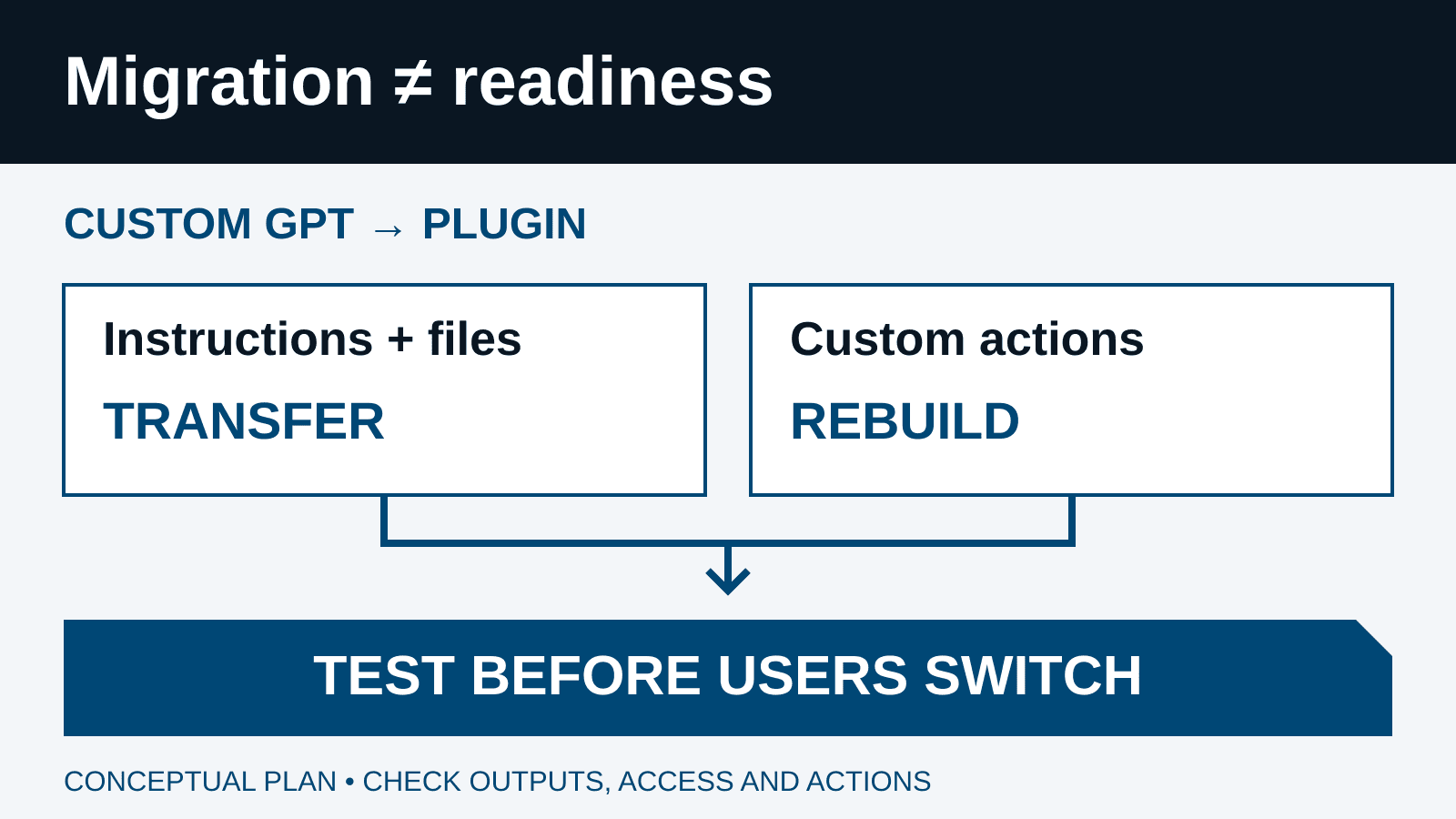
Treat custom GPT migration as a business-workflow change, not a file-copy exercise. Inventory the workflows people actually depend on, preserve an approved baseline, reconcile the replacement, and test it with the people and permissions that will use it. Switch users only when the required answers, integrations, and controls work together. A successful migration message is not evidence that the business process still works.
For a leader, the central question is simple: can the team finish the same approved work without losing an important rule, exposing a restricted file, or performing an unintended action? The checklist below turns that question into an accountable migration record. It is ITECS implementation guidance, not a promise that every GPT can move without redesign.
The dates—and a discrepancy worth knowing about
Checked September 22, 2026: OpenAI's current migration FAQ gives affected Enterprise workspaces a September 22 migration target, an October 26 creation cutoff, and December 11 retirement. These milestones can change; availability varies. Follow the notice for the account or workspace that created the GPT.
The Enterprise and Edu release notes are not fully synchronized with that FAQ: their September 11 migration entry still lists September 17 and September 25 for the first two milestones. The September 17 entry itself covers other features, not a revised migration schedule. Do not turn an older release-note date into an internal deadline without checking the current notice. Ask the workspace administrator or account team to resolve any conflict.
Put a named owner and last-checked date beside every milestone in your change calendar. Schedule the business cutover early enough to repair a failed test; the provider's retirement date should not be your first production test. If the migration option has not reached your workspace, inventory and baseline work can still proceed.
1. Inventory workflows, owners, and active users
Create one migration record per GPT, including its URL or identifier, creator, owning workspace, business owner, technical maintainer, and backup contact. Capture its purpose, recent use where authorized usage evidence is available, departments served, criticality, and downstream dependencies. Ask team leads about bookmarked or publicly shared GPTs that may not appear in a central inventory.
Classify each workflow: migrate, redesign, replace with an existing approved tool, or retire. An unused experiment does not deserve the same effort as a daily customer-support assistant. A GPT that depends on a creator outside your organization needs a replacement contact and a contingency plan, not an assumption that your administrator owns it.
Record who needs the replacement and what they need to do—not just a headcount. Separate maintainers, ordinary users, approvers, and people who should be denied access. Identify absent owners and critical integrations first. For broader ownership and operating controls, connect this work to your custom AI agent program.
2. Freeze a usable baseline before migration
Migration uses the latest published version, not drafts. Publish essential edits first; public sharing is unnecessary. Record the version you intend to preserve.
Keep an access-controlled baseline package: instructions, approved reference-file inventory and versions, conversation starters, tool contracts, sharing expectations, and representative prompts with reviewed outputs. Preserve originals through authorized storage or export methods; do not assume a universal one-click backup. Do not put passwords, tokens, customer records, or sensitive transcripts into a broad project tracker.
Choose prompts from recurring work and record what makes an answer acceptable. For a policy assistant, that may mean the correct policy version, an attributable source, and a clear escalation when rules conflict. Capture the selected model and available tools during the baseline. Compare meaning and business requirements, not exact wording: generative responses can differ without being wrong.
3. Reconcile what moved and what did not
- Instructions → skill
- Compare rules, examples, exclusions, and expected outputs.
- Knowledge → reference files
- Check file inventory, versions, retrieval, and sensitive content.
- Connected apps → apps
- Retest access and each required operation as an intended user.
- Custom actions → rebuild separately
- Assign an integration owner; prove equivalent behavior and controls.
Model selection, conversation history, sharing, and installation do not transfer; the replacement starts private. Migration requires creator or authorized Enterprise-admin access. Check the migration FAQ for your account.
Turn the map into a reconciliation checklist. Compare instruction sections and file counts, but also open representative files and ask questions whose answers depend on them. A familiar filename does not establish that its contents are current or retrievable. Check references to old tool names, links, and steps that no longer apply. Store the resulting plugin identifier and evidence beside the original GPT record.
A copied reference file deserves a fresh audience review. It is a distributed copy, not proof of a live link to the original repository's current permissions or retention rules. Minimize client and employee data in bundled material. Have the information owner decide whether a file belongs in the plugin at all or should be retrieved through an approved, permission-aware source.
4. Rebuild custom actions as a separate integration project
Custom actions do not transfer. Assign an integration owner to evaluate replacement options. Do not label an integration complete because its connection authenticates.
For each old action, document the business operation, endpoint contract, required inputs, returned fields, read or write effects, credentials owner, and approval point. Map that operation to a specific supported replacement capability. If no equivalent exists, redesign the step or keep it manual until a tested implementation is available. Never substitute a broader write-capable tool merely because it is convenient.
Test failure behavior as seriously as the happy path. An expired account should produce a clear access failure, not a fabricated success. A timeout after a write requires reconciliation before retrying. Check duplicate prevention, partial completion, wrong-record selection, and whether the response distinguishes a proposed action from an action that actually happened. Keep secrets in approved credential storage, never in skill instructions or reference files.
OpenAI's plugin documentation distinguishes reusable skills from connected capabilities. External services retain their own authentication and terms; supported surfaces vary. Test the web, desktop, or other client your users actually rely on rather than assuming a working desktop integration is universally available.
5. Review installation, data access, and approvals separately
OpenAI's admin controls guidance separates plugin installation from underlying app access. Enterprise and Edu offer applicable role controls; Business administrators manage app availability workspace-wide. Review the controls exposed in your actual workspace instead of copying a policy from another plan.
Check four layers: who can install the plugin, which apps they may use, what the connected provider identity can access, and which actions require approval. Available allows eligible users to install; Installed makes the plugin a default installation for the applicable audience. Neither is a grant of unrestricted company-data access. App action controls and approval settings are separate, and not every app exposes every control.
Use a pilot audience matched to the business purpose. Test with a regular user and a deliberately restricted account, not only the administrator who set it up. Confirm the correct provider account and organization, read/write scopes, approved records, and recipient boundaries. Keep consequential changes—such as sending a customer message or updating a financial record—subject to the approval your business requires.
Write down who may edit the plugin, share it, and publish it to the workspace directory. These should be deliberate responsibilities. Review workspace administration practices alongside the migration so an easier installation process does not quietly expand mutation rights.
6. Test familiar tasks and failure cases with evidence
| Test case | Evidence to retain |
|---|---|
| Familiar task | Correct source, required fields, useful answer, and expected format. |
| Ambiguous or missing evidence | Requests clarification or states the gap instead of inventing a policy. |
| Restricted record | An unauthorized test user receives no protected content. |
| Integration failure | Expired sign-in, denied scope, timeout, and partial failure are visible. |
| Consequential action | Correct target and parameters; required approval precedes execution. |
| Repeated request | A retry cannot silently create duplicate tickets, messages, or transactions. |
Use the same approved input set for the baseline and replacement. Record the date, version, model where visible, user role, connected accounts, expected result, observed result, and reviewer decision. Include multi-turn follow-ups: a plugin may answer the opening request correctly but lose a constraint when the user asks for a revision.
Repeat important cases and score required facts, omissions, source use, tool choice, output structure, and action correctness. Mark critical access or unauthorized-write failures as blockers for that workflow. Define acceptable variation before reviewing results, and have the business owner resolve disagreements. Our agent evaluation guide explains why a polished final answer alone is an incomplete test.
Example: migrate a service-desk triage assistant
Consider a hypothetical internal assistant that reads a support handbook, recommends a priority, and creates a ticket through a custom action. Its business owner wants staff to keep using the same intake process. This is an illustrative design, not a report of an ITECS client deployment.
The team captures approved handbook questions and expected routing decisions, preserves the instructions and handbook version, and assigns an engineer to the ticketing replacement. It tests a routine password issue, an ambiguous outage, a restricted customer record, and an unavailable ticketing service. A technically successful migration that cannot create tickets is not a successful migration of this workflow.
Suppose the replacement picks the right priority but writes to the wrong queue. The team holds cutover, corrects the routing contract, and reruns the affected tests plus the restricted-record and duplicate-ticket cases. A service lead checks the actual ticket in the source system. Only then do pilot users receive replacement instructions. The useful evidence is completed work in the correct system, not a chatbot saying that a ticket was created.
7. Communicate cutover and keep recovery realistic
1. Inventory and baseline
Name the owner, users, published version, files, tools, and acceptance cases.
2. Migrate and reconcile
Inspect the replacement; separately implement missing integrations.
3. Pilot as real user roles
Test allowed work, denied access, failures, and approval boundaries.
4. Approve and communicate
Record evidence, publish the replacement instructions, and assign support.
5. Cut over and monitor
Watch task success and exceptions; use the documented recovery path if needed.
Give users the replacement link, installation steps, connection requirements, a familiar starter task, known differences, cutover date, and support contact. Replace bookmarks and internal how-to links. Have an intended user install and complete a real approved task before announcing readiness to the department. Include role-specific AI training when invocation or approval behavior changes.
Keep the original baseline and a tested manual path. Before retirement, the read-only GPT can remain a temporary comparison or fallback where access permits; it is not a durable rollback after retirement. Plan a manual operating path for failures that outlast its availability.
Define who can pause rollout and what happens to partially completed work. Record any source-system changes separately: returning to an older prompt does not undo a sent message or database update. Avoid disabling a shared app as a reflex; first identify other workflows that depend on it. OpenAI's plugin guidance also notes that uninstalling a bundle does not automatically disconnect separately connected MCP integrations.
Measure continuity, not the number of plugins created
Track the share of critical workflows accepted by their owners, intended users who can complete a representative task, unresolved integration gaps, permission failures, rework, and time per completed task. Review exceptions daily during cutover, then at a cadence matched to business risk. A migration dashboard should expose an orphaned owner or a broken action, not hide it behind a green total.
The finish line is a supported replacement with documented instructions, approved data access, tested tools, trained users, and an owner for future changes. ITECS can help turn a scattered GPT inventory into a scoped migration and evaluation plan. Discuss your workflow and governance requirements before a retirement date becomes an operational incident.