
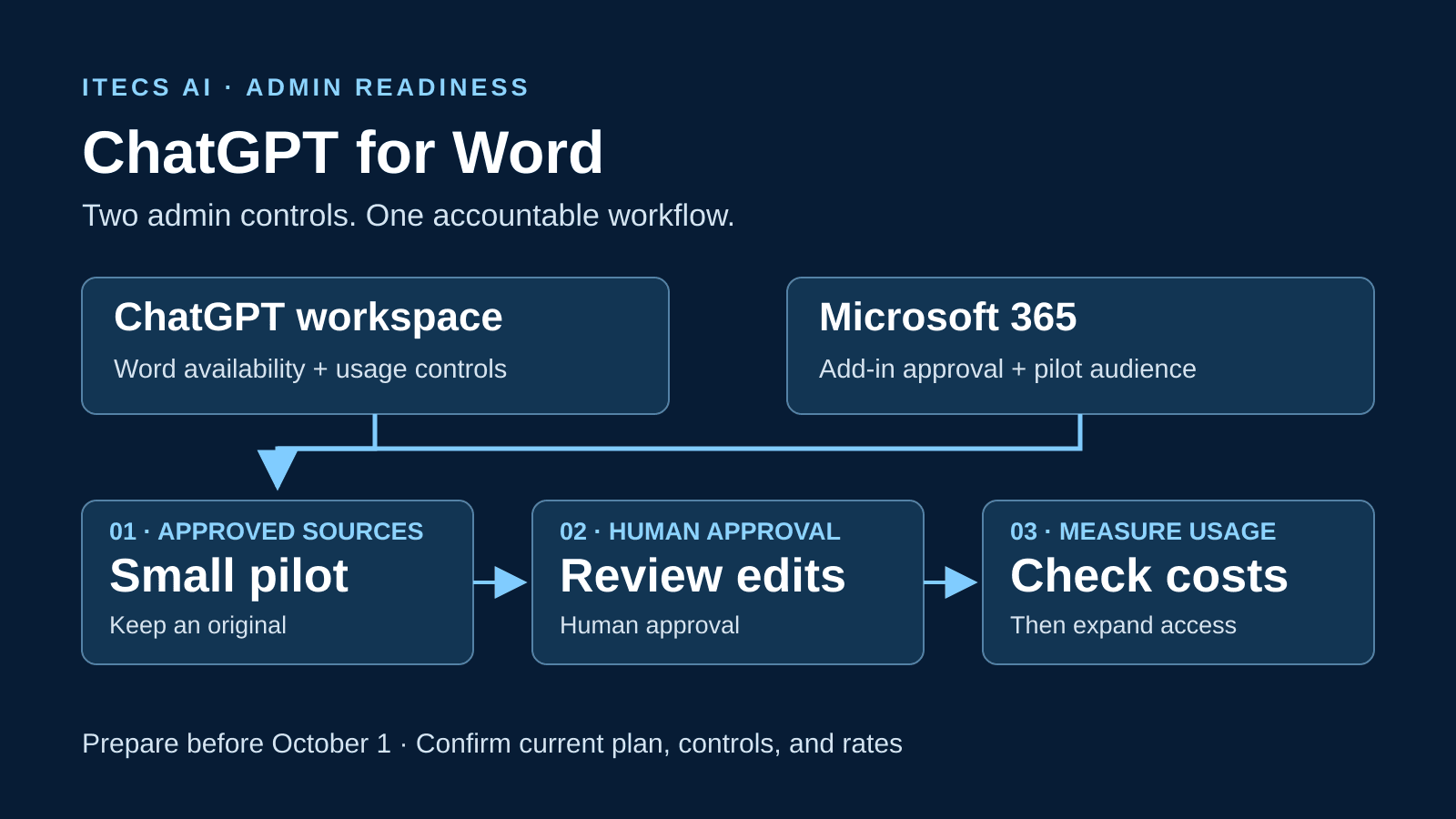
Before ChatGPT for Word becomes broadly available to your staff, decide who may use it, which documents they may process, who approves the resulting edits, and how usage will be paid for. Default availability is not a business decision to send every document to an AI service. A small, measured pilot gives administrators a way to answer those questions before the tool becomes part of daily work.
OpenAI's September 17 Enterprise and Edu release notes announce ChatGPT for Word and planned default enablement on October 1, 2026. Access involves both ChatGPT workspace controls and Microsoft 365 add-in approval. That date does not mean Microsoft automatically deploys the add-in to everyone. These details were checked September 23; recheck your workspace notice before the change.
There is a second calendar item: the current rate cards describe a GPT-5.6 Sol free preview in Word through September 30 for eligible Business and Enterprise use. Do not use a zero-cost preview as the steady-state budget. This guide separates vendor-documented behavior from ITECS's recommended rollout practices; it is not a report of a client deployment.
Start with two administrative owners, not one switch
1. ChatGPT workspace administrator
Verify Word availability, allowed workspace use, and applicable usage controls. Record who can change them.
2. Microsoft 365 administrator
Verify the approved add-in, pilot assignment, and existing installation policies. Test a nonpilot account.
3. Document owner and reviewer
Approve sources and originals; compare edits, resolve errors, and authorize the final document.
4. Business and spend owner
Review time saved, rework, quality, and attributed usage before expanding the audience.
Ask the ChatGPT administrator and Microsoft 365 administrator to record the actual workspace, tenant, allowed account type, intended audience, and current settings. Capture a dated configuration record without tokens or document contents. Agree who can expand the pilot and who can pause it. A department manager should not have to discover the responsible administrator during an incident.
Microsoft's centralized deployment guidance supports assigning add-ins to selected users or groups and recommends phased deployment. Start with a small business-and-IT group through the applicable Integrated apps controls. Allow for propagation and client restart: Microsoft notes that add-in availability can take 24–72 hours. Test the clients your staff actually use.
Central assignment alone is not proof that everyone else is excluded. Microsoft's add-in management guidance distinguishes administrative assignment from users' ability to acquire apps. Review existing installation policies and test an ordinary nonpilot account. Do not change tenant-wide marketplace policy casually as a side effect of this pilot.
Define the documents and sources the pilot may use
Choose one low-risk recurring task: for example, drafting an internal project update from an approved status report. Identify its document owner, intended readers, permitted reference material, and final approver. Start with synthetic or explicitly cleared examples before introducing real business records. Exclude categories that have not been approved—such as privileged advice, personnel records, credentials, or confidential client material—rather than asking users to improvise the policy.
Use your organization's existing classification and information-handling rules. Record approved storage locations, retention expectations, connected accounts, and any restrictions on sending material to an external processor. Verify the applicable agreement and data controls with the responsible owner. A commercial AI subscription is not, by itself, approval for every customer contract or regulated record.
OpenAI's Word guidance describes working with the open document and selected text, including drafting, summarization, revision, and formatting. Other local files are not automatically referenceable. Connected apps depend on availability and permissions. Treat source selection as deliberate: minimize pasted context and confirm which account and repository are connected.
Test existing sensitivity labels, document restrictions, and data-loss-prevention behavior in your actual setup. Do not assume an add-in inherits every protection in the way your team expects. Use approved synthetic markers in allowed and denied test documents; record whether the intended user can retrieve, process, copy, or share them. Investigate an unexpected result before expanding the audience.
Preserve the original and test the whole editing workflow
Keep an approved original in access-controlled storage and work on a separate pilot copy. Where version history is available, verify that the team can actually restore it. Name the reviewer and define what must remain unchanged: contractual commitments, financial figures, attribution, dates, disclaimers, and required headings are common examples.
| Task | What to verify |
|---|---|
| Draft from approved notes | Required facts survive; no invented commitments or dates; a reviewer approves the result. |
| Summarize a source document | Important exceptions, figures, and qualifications remain; cited sources support the summary. |
| Revise and format | Tables, numbering, headings, and meaning survive; inspect the rendered document, not just the response. |
| Restricted content and accounts | Synthetic denied-source tests behave as intended; the user is in the correct tenant and workspace. |
| Track, compare, and restore | Actual edits and comments are inspectable; acceptance/rejection works as required; the original can be restored. |
| Measure usage and recovery | Attribution matches the task; revisions are included; users can complete the work manually after disablement. |
Do not equate a polished paragraph with a correct document. Compare the output against the original and trusted source records. Open citations and check that they support the stated claim; verify units, totals, dates, names, and qualifying language. Have an accountable person approve content before it reaches a client, a filing, or another consequential business process.
Tracked changes deserve their own test. Do not assume every AI edit will appear as a tracked revision or preserve the reviewer state your process needs. Test Track Changes, comments, acceptance and rejection, and document comparison on the actual client. If the result cannot be inspected reliably, use a separate draft and a controlled comparison before copying approved text into the authoritative document.
OpenAI warns that Word responses can contain mistakes or unintended changes and that complex formatting may need manual adjustment. Make restoration and visual inspection part of the test, not an afterthought. Our AI evaluation guide explains why the completed workflow matters more than the final answer alone.
Do not assume ChatGPT context follows users into Word
The current Word FAQ says add-in conversations are separate from ChatGPT history; memory and existing skills do not carry over. Word supports skills, but that does not mean an existing skill is automatically present. Plugins are not currently supported. Test the specific surface rather than promising users their familiar setup will follow them.
Give pilot users a short, approved task brief: purpose, audience, authoritative source, prohibited changes, and required review. Supply only the context necessary for the document. Check whether any required reusable instructions are actually available and behave correctly in Word. Do not paste confidential chat history into the document merely to recreate continuity. If a workflow depends on a plugin integration, keep that step in a supported environment or make it manual; the custom GPT migration checklist is a separate planning exercise, not evidence of Word compatibility.
Budget for October usage, not September's preview
The Enterprise USD rate card applies to eligible token-based agreements; contract terms and discounts matter. The Business and Enterprise/Edu credit-based rate card describes a different billing unit. Its Word preview is stated for Business and Enterprise. Do not infer Edu preview eligibility or pricing simply from Edu feature availability; confirm the agreement.
| Token category | USD | Credits |
|---|---|---|
| Input | $4 | 100 |
| Cached input | $0.40 | 10 |
| Output | $20 | 500 |
Illustrative arithmetic, not a document quote: at those standard Sol rates, 50,000 uncached input tokens plus 10,000 output tokens would cost $0.40 under the listed USD rates, or consume 10 credits under the listed credit rates. These are alternative billing systems, not a credit-to-dollar exchange rate. The example excludes discounts, other charges, and preview treatment. Actual metered input is not the document's word count; follow-up requests and retries can change total usage.
Word draws on shared agentic usage where applicable, so include existing Codex and other eligible workspace activity in planning. Confirm the selected model and its rate rather than assuming every user has the same model. Record usage for a representative approved task, including review-driven revisions, and calculate cost per approved document. A fast first draft that needs repeated repairs can be a poor operational trade-off.
OpenAI's Enterprise and Edu usage-limit guidance distinguishes per-user limits, workspace budgets or credit overage controls, and alerts. Alerts notify; they do not stop usage. Reporting can lag, and an in-flight request can slightly exceed a user limit. Verify that Word usage is attributed as expected in your workspace; do not invent a separate hard Word cap. Business administrators should use the controls their plan actually exposes.
Assign a spend owner, select a pilot allowance appropriate to the task, and define a review cadence. Establish an escalation before expanding the group or changing models. Compare a metered cost estimate with observed billing after the preview; do not wait for an unexpected invoice to discover that your measurement covered only part of the workflow.
Train users and measure accepted work
Run one supervised session that includes a good draft, an incorrect figure, a weak citation, a formatting failure, and a denied-source case. Show how to preserve the original, select minimal context, inspect revisions, report a problem, and finish without AI. Make the support contact and document-sharing rules easy to find. Role-specific AI training should teach review decisions, not just prompt wording.
Compare like-for-like tasks with and without the add-in. Record total time to an approved document, reviewer time, corrections, critical defects, abandoned attempts, and attributable usage. Ask reviewers whether the output preserved meaning and required qualifications. Keep metrics aggregated where possible; a pilot dashboard does not need sensitive document text or employee prompts.
For a hypothetical project-update pilot, success could mean completing an accurate, approved update with less combined drafting and review effort. An invented delivery date or an exposed restricted paragraph is a failure even if the document took seconds to generate. Agree on acceptable results before testing, and let the business owner decide whether observed quality warrants a larger audience.
Write disablement and recovery steps before broad enablement
Record the current Word setting in the ChatGPT admin console and the applicable Microsoft 365 assignment. OpenAI uses the same Microsoft add-in across Word, Excel, and PowerPoint; removing it broadly can affect other workflows. Prefer the narrow supported Word control when it fits the incident, and have the Microsoft 365 owner manage assignment changes where needed. Verify effective access with a fresh session and the affected user role rather than assuming an immediate change.
Pausing access does not undo document edits, reverse incurred usage, or establish that provider-held data was erased. Restore the approved document copy, reconcile any content already shared, and follow your normal incident process if sensitive material was exposed. Retain the change record and required evidence in restricted storage. Test the manual editing path so work can continue while the issue is investigated.
Before the October 1 change, the two administrators and business owner should be able to produce one short readiness record: pilot audience, approved sources, tested review behavior, cost owner and limits, known failures, training date, and recovery instructions. Recheck the current vendor notice, then make the expansion decision on your evidence—not the default setting. Talk with ITECS about coordinating a governed Word pilot with your wider AI operating model.