Start a ChatGPT Voice for Work pilot with one low-risk task, a small approved audience, and connections that cannot change business records. Add narrowly defined write actions only when users can review them on screen and your team can verify the result. Speaking to an agent should make an approved workflow easier to use—not grant it more authority.
OpenAI's September 23 release notes add plugin support to Live on web, iOS and Android, and Voice to Work on web and mobile. Voice in Work requires both Voice and Work access. An unfinished Work task can continue in text after the call ends. Hanging up is therefore not a reliable way to cancel work.
This guide was checked September 24, 2026. Product details below are attributed to OpenAI; the pilot design, tests and example are ITECS recommendations, not a report of a customer deployment. The business decision is whether people can complete accurate, authorized work with less total effort—not whether speaking feels faster than typing.
Confirm the experience each pilot user actually has
OpenAI's Voice FAQ says options vary with plan, workspace, region and app version. Live currently does not support video or screen sharing; Advanced Voice and desktop Voice are different experiences. Do not build a rollout checklist that treats them as interchangeable.
Record the workspace, seat, region, client version, intended mode and available Voice control for each pilot role. Test the actual web, iOS, Android or desktop client people will use. A launch announcement is not proof that a particular account has access. If the required combination is unavailable, keep that workflow in its approved text or manual process while the administrator resolves eligibility.
The Work and Codex guidance distinguishes Work Cloud, Work Local and Codex Local permissions. Codex is not a selectable mode on web or mobile; remote desktop access is a separate path. Verify the applicable controls rather than enabling every execution surface for a Voice pilot.
The Work admin FAQ describes custom role controls for eligible Enterprise and Edu workspaces; Business does not offer the same custom-member RBAC. Use the controls your plan provides. Where fine-grained assignment is unavailable, do not claim a department-only technical restriction merely because only that department received an invitation.
Choose a task owner, workspace administrator, connected-system owner, reviewer and backup contact. Select participants by job need, not enthusiasm alone. Record permitted tasks and exclusions, test a nonpilot account, and agree who can pause expansion. Connect this pilot to your existing Work administration checklist, rather than creating a second informal access process.
Approve the connection chain, not just the plugin name
OpenAI's plugin and app controls separate installation, app access, action controls and provider OAuth scopes. Available controls differ by app. A plugin being installed is not evidence that its connected identity has the right permissions.
Create a compact inventory: business purpose, plugin, underlying app, provider account and tenant, allowed records, read/write scopes, enabled actions, approval behavior, connection owner and review date. Approve only what the task needs. Prefer synthetic data for the first tests; do not connect an administrator's broadly privileged account just to simplify setup.
The admin FAQ also covers approved shared connections. Such an identity can have access different from the individual user. Inspect its actual source-system permissions instead of assuming every action inherits the speaker's personal access. Keep the audience and account relationship explicit.
For the initial pilot, disable write-capable actions where supported and use a provider identity with read-only access. Inspect effective permissions with an ordinary pilot user. If the necessary restriction cannot be enforced for a connection, exclude it from the read-only pilot. A prompt saying 'do not write' is useful task guidance, not a substitute for access control.
Make on-screen approval a tested operating rule
For web and mobile, OpenAI's Voice guidance says actions needing approval use on-screen controls; spoken approval is not supported. This does not mean every write automatically prompts under every permission configuration. The pilot must establish which actions require review.
The app-permission guidance makes an important distinction: Allow read actions permits reads without prompting but asks before changes. It does not disable writes. Always ask requests approval for reads and changes. Broader settings can permit supported actions without further prompts, and connection-specific settings can differ.
Keep writes unavailable in phase one. For a later, narrowly approved write workflow, verify a policy that requires the intended on-screen review. Inspect the approval card's app, account, destination and proposed change. Test decline as well as approval. If that review cannot be enforced or reliably inspected on the chosen surface, keep the write step manual.
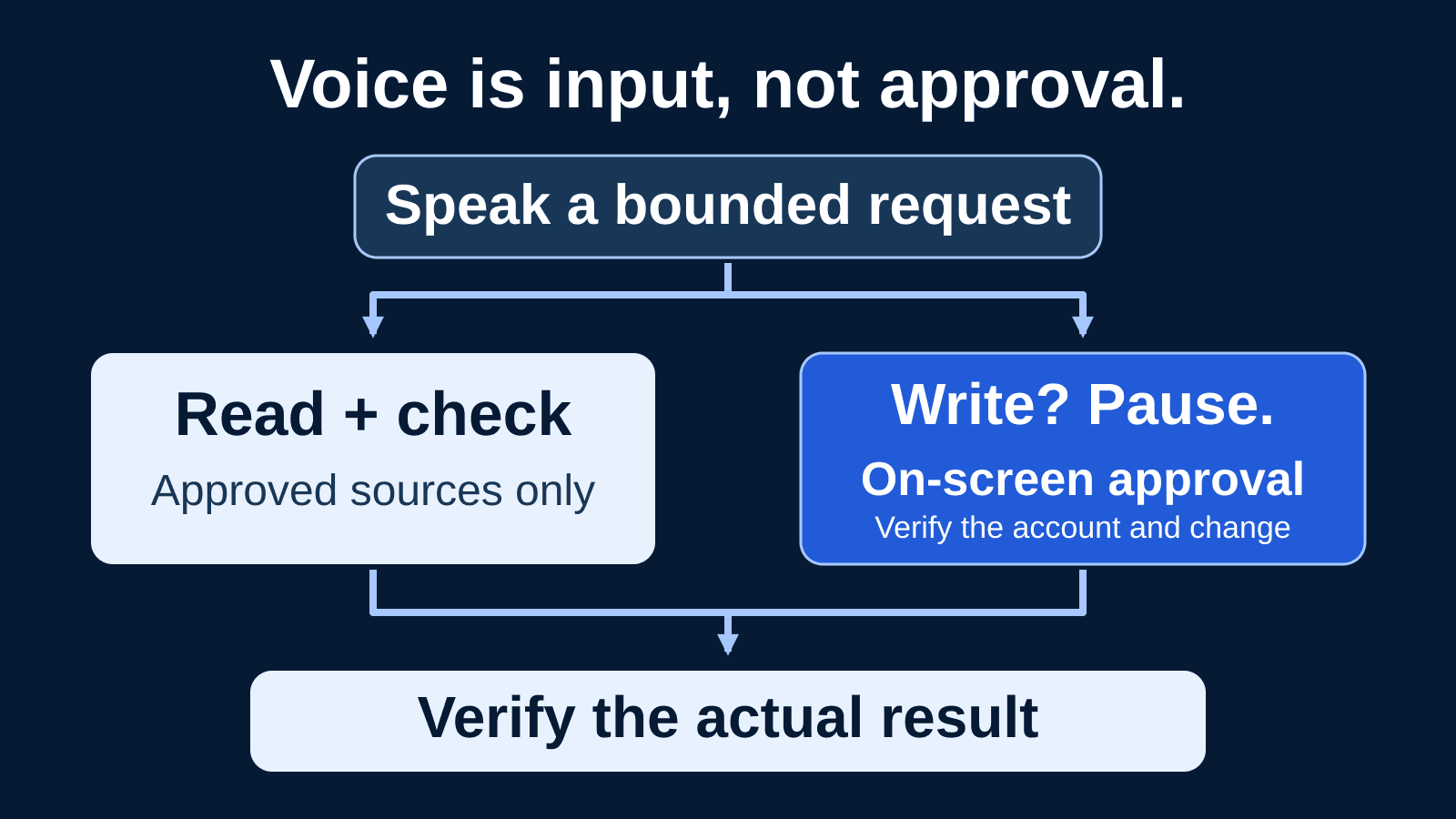
1. Speak a bounded request
Name the approved source, account, task and intended audience. Speech supplies instructions, not extra authority.
2. Prepare and inspect
Read permitted records and draft a result. Check sources and account selection before considering an external change.
3. Pause before a write
For the pilot's permitted write actions, require an on-screen decision. Review the destination and exact change; decline anything unexpected.
4. Verify and record
Inspect the actual source-system result and available logs. Record completion, partial failure or cancellation rather than trusting a spoken success message.
Do not transfer the same terminology blindly to local coding tools. OpenAI's local permission documentation separates the sandbox boundary from approval behavior; local Ask for approval does not mean every in-workspace file edit requires a click. A Voice pilot involving desktop Codex needs a separate review of local directories, commands, network access and execution permissions.
Example: prepare an internal project update by voice
Consider a hypothetical operations lead who needs a weekly update from an approved project tracker. The team has verified a supported read connection and selected a test project. The lead asks: 'Use the operations account and the approved Atlas status record dated September 24. Summarize overdue milestones and unresolved blockers for the internal project team. Draft only; do not send.' These names and dates are illustrative, not a claimed integration or customer result.
The agent retrieves permitted records and prepares a draft. The lead checks the written response against the tracker: correct project, reporting date, owners, exceptions and source references. A confident summary that assigns a blocker to the wrong team is a failed result, even if the source retrieval succeeded. The reviewer corrects it before anyone relies on it.
In a later pilot phase, suppose an approved connector supports sending that update. The lead requests the specific destination, then reviews the actual on-screen action, recipients and message. Saying 'yes' during the call is not the approval step. After explicit approval, the lead checks the destination system for the correct message and records its identifier through approved internal storage.
If the tool times out, the lead checks whether the message exists before retrying. If the call ends, the lead opens the continuing task in text rather than assuming it stopped. This small example exercises source selection, review, approval, result verification and recovery—the parts a smooth voice demonstration can hide.
Test interruptions, permissions and results before expanding
| Test | Evidence to inspect |
|---|---|
| Account and source | Use synthetic allowed and denied records. Verify the intended tenant, provider identity, source and audience; denied data must stay inaccessible. |
| Approval and refusal | Request a permitted test write, say yes without clicking, then decline on screen. Confirm no mutation. Test the actual approval policy with a nonadmin account. |
| Misheard or interrupted request | Use similar names, amounts and dates; interrupt mid-request. Check the written task and selected record before proceeding. Do not interpret a transcript as authorization. |
| Call ends; work continues | End a call during a harmless task, locate its text continuation, and test explicit task cancellation. Verify whether any operation already completed. |
| Microphone and screen context | Test denied microphone permission and mute/exit behavior. Where desktop screen context is approved, use synthetic offscreen sensitive text to inspect the actual attachment. |
| Failure and duplicate prevention | Simulate an unavailable source or ambiguous result in a safe test environment. Reconcile provider state before retrying a possible write. |
| Evidence, limits and recovery | Trace a completed task to available action records and usage. Test access removal, running-task handling and a manual handoff; note logging gaps explicitly. |
Record expected behavior, observed behavior, account and role, client version, date, reviewer and evidence for each test. Repeat important cases with different phrasing and ordinary background noise. Use safe test records for failure cases; never induce a real customer incident to prove a control. Our agent evaluation guide explains why tool behavior and completed work matter alongside the final answer.
Voice transcripts may not match the audio exactly, according to the Voice FAQ. Confirm names, amounts, dates and destinations in the written task and action details. Treat the transcript as one evidence source, not proof that a person authorized a particular external change.
Inspect microphone, screen context and retention separately
Use OS and browser microphone permissions deliberately, and teach mute, exit and explicit task cancellation as different actions. Conduct business calls in an appropriate environment; nearby people can hear spoken answers. Avoid reading secrets aloud. Decide which document and data classifications are acceptable before connecting real sources.
Desktop screen context deserves a distinct test. OpenAI's desktop Voice documentation says a macOS appshot can include a frontmost-window screenshot and accessible app text extending beyond the visible area. Screen recording and Accessibility permissions may be involved. A tidy visible window is not proof that the attachment contains only what the user can see.
Keep screen context off unless the workflow requires and authorizes it. Test with synthetic sensitive markers, inspect what is attached, and confirm the available organizational and OS controls. Do not confuse this desktop capability with Live video or screen sharing on web and mobile.
The Voice FAQ states that Live and Advanced Voice clips are retained for 30 days. Deleting the chat starts associated clip deletion within 30 days, subject to stated security, legal and previously shared, disassociated training-data exceptions. Archiving is not deletion.
Map audio, transcripts, generated files, connected-system records and audit evidence separately. Confirm your workspace agreement, retention settings, training controls and provider terms with the responsible owner; do not assume one audio rule covers every artifact. Minimize sensitive content in pilot evidence and restrict access to recordings or transcripts. Retain required incident evidence through your established process rather than deleting it to tidy a test.
Budget for tasks as well as conversation time
The Work and Codex guidance distinguishes web/mobile Voice allowances from Work task usage. Desktop Voice has separate connected-time charging where applicable, while Work and Codex tasks can share agentic usage or credits. Confirm your plan, agreement, rates and available limits; do not assume one free voice allowance pays for all resulting work.
Assign a spend owner and a small pilot allowance using the controls actually available. Establish when usage will be reviewed and who can expand the audience. Record conversation time where reported, task usage, retries and follow-up work. Compare cost per accepted task and total preparation-plus-review time against the manual baseline. An alert should not be described as a hard stop without verifying its behavior.
Verify evidence coverage too. The Work admin FAQ cautions that analytics and audit surfaces have different coverage; local Codex OpenTelemetry is not a log of hosted Work activity. Reconcile available task and action records with provider logs. If an approval or external action cannot be traced as your policy requires, document the gap and keep that workflow out of the broader rollout.
Train users, then rehearse disablement and recovery
Teach a short habit: name the source and account, state the desired outcome, inspect the written result, and pause before anything consequential. Have users practice a misheard amount, a wrong destination, a denied action and an unfinished task. Nobody should need to improvise a hands-free approval while driving or otherwise unable to review the screen. Use role-specific AI training to make these decisions familiar.
Write a recovery card naming who can restrict Work access, disable the relevant app or action, revoke the provider connection, and handle running tasks. Use the settings actually available for that workspace. Check dependencies before disabling a shared connection. Preserve evidence, reconcile partial writes, and assign any corrective source-system action to an authorized owner. Disabling access does not retract a message already sent.
OpenAI's admin controls guidance distinguishes new-action policy from existing actions. Disabling newly introduced actions alone is not a complete shutdown of an already enabled integration. Test the specific existing action after a restriction changes.
Finish the drill by confirming the relevant task is stopped, access is removed as intended, and a person can complete the work manually. Expand only after the business owner accepts the evidence for quality, permissions, approvals, cost and recovery. ITECS can help turn that evidence into a practical rollout through AI consulting. Discuss your Voice and Work pilot before spoken convenience becomes an unreviewed business process.